6 posts tagged with "Tools"

Productivity and development tools

View All Tags

Run Your Own OpenAI-Compatible API with LM Studio

· 7 min read
Ashish Kapoor
Software Engineer

A practical guide to downloading GGUF models, loading them locally, and exposing an HTTP endpoint your code can actually talk to.

What You're Actually Building

By the end of this guide, you'll have:

  • A locally running LLM loaded in LM Studio
  • An HTTP server at http://localhost:1234 that speaks the OpenAI API dialect
  • A verified endpoint you can hit with curl, the openai Python SDK, or any tool that accepts a base_url

No cloud. No API key costs. No data leaving your machine.


Prerequisites

RequirementWhy
LM Studio installed (v0.3.x or later)Tested against current API surface
8 GB RAM minimum (16 GB recommended)Needed to load a 7B Q4 model comfortably
~5–10 GB free disk spaceFor the model file
Python 3.8+ (optional)For the verification step at the end

Download LM Studio from lmstudio.ai. It's available for macOS, Windows, and Linux.

First-run requirement: Open the LM Studio GUI at least once before using the CLI (lms). This initializes the local config.


Step 1 — Download a GGUF Model

You have two paths: GUI or CLI. Both work. Pick one.

  1. Open LM Studio.
  2. Press Ctrl + Shift + M (Windows/Linux) or ⌘ + Shift + M (Mac) to open the model search.
  3. Type a model name — for example, qwen2.5-7b-instruct.
  4. LM Studio will show available quantizations and highlight the recommended one for your hardware (usually Q4_K_M for most machines).
  5. Click Download.

You can also paste a full Hugging Face URL directly into the search bar. Example: https://huggingface.co/lmstudio-community/Qwen2.5-7B-Instruct-GGUF

Path B: CLI Download

# Download by Hugging Face repo name
lms get lmstudio-community/Qwen2.5-7B-Instruct-GGUF

# Specify a quantization with @
lms get lmstudio-community/Qwen2.5-7B-Instruct-GGUF@Q4_K_M

What's a Quantization Level?

GGUF files come in variants like Q4_K_M, Q5_K_S, Q8_0. The number refers to bits-per-weight. Rule of thumb:

QuantRAM footprint (7B model)Use when
Q4_K_M~4.5 GBStandard choice — best quality/size tradeoff
Q5_K_M~5.5 GBSlightly better quality, fits if you have headroom
Q8_0~8 GBNear-lossless, needs more VRAM/RAM

Don't overthink this. Start with Q4_K_M.

Manual Import (If You Already Have a .gguf File)

LM Studio expects a specific directory structure. Place your file here:

~/.lmstudio/models/
└── publisher-name/
└── model-name/
└── model-file.gguf

Example:

~/.lmstudio/models/
└── lmstudio-community/
└── Qwen2.5-7B-Instruct-GGUF/
└── Qwen2.5-7B-Instruct-Q4_K_M.gguf

Or use the CLI import command:

lms import /path/to/your/model-file.gguf

After placing files in the correct structure, the model will appear under My Models in the LM Studio UI.


Step 2 — Load the Model

Before the server can serve a model, the model must be loaded into memory.

Via the UI

  1. Press Ctrl + L (or ⌘ + L) to open the model loader.
  2. Select your downloaded model from the list.
  3. LM Studio will auto-select load parameters optimized for your hardware (GPU offload, context size, etc.).
  4. Wait for the progress bar to complete.

Via CLI

# List your downloaded models
lms ls

# Load a model by its identifier (use the key shown in lms ls)
lms load lmstudio-community/Qwen2.5-7B-Instruct-GGUF

GPU offloading: If you have an NVIDIA or Apple Silicon GPU, LM Studio will offload layers to it automatically. In the UI sidebar, you can also drag the GPU Offload slider to max to force full GPU inference — this dramatically speeds up generation.


Step 3 — Start the HTTP Server

This is the key step that turns LM Studio from a chat app into a backend.

Via the UI

  1. Go to the Developer tab (the </> icon in the left sidebar).
  2. Toggle "Start Server" to ON.
  3. You'll see: Server running at http://localhost:1234

Via CLI

lms server start

To confirm it's running:

lms server status

The server listens on port 1234 by default. You can change this in the Developer tab settings.


Step 4 — Verify the Endpoint

With curl

curl http://localhost:1234/v1/chat/completions \
-H "Content-Type: application/json" \
-d '{
"model": "lmstudio-community/Qwen2.5-7B-Instruct-GGUF",
"messages": [
{"role": "user", "content": "Reply with: working."}
],
"temperature": 0.1
}'

Expected response shape:

{
"id": "chatcmpl-...",
"object": "chat.completion",
"choices": [{
"message": {
"role": "assistant",
"content": "working."
},
"finish_reason": "stop"
}],
"usage": { "prompt_tokens": 12, "completion_tokens": 2, "total_tokens": 14 }
}

Check Which Models Are Loaded

curl http://localhost:1234/v1/models

This returns a JSON list of currently loaded models. The id field in each entry is what you pass as "model" in your API calls.


Step 5 — Use It Like the OpenAI API

The endpoint is a drop-in replacement. You only need to change two things in any existing OpenAI client code:

  1. base_urlhttp://localhost:1234/v1
  2. api_key → any string (LM Studio doesn't validate it; "lm-studio" is the conventional placeholder)

Python Example

from openai import OpenAI

client = OpenAI(
base_url="http://localhost:1234/v1",
api_key="lm-studio",
)

response = client.chat.completions.create(
model="lmstudio-community/Qwen2.5-7B-Instruct-GGUF",
messages=[
{"role": "system", "content": "You are a helpful assistant."},
{"role": "user", "content": "What is 17 multiplied by 4?"}
],
temperature=0.2,
)

print(response.choices[0].message.content)

Install the OpenAI SDK if you haven't:

pip install openai

Streaming Example

stream = client.chat.completions.create(
model="lmstudio-community/Qwen2.5-7B-Instruct-GGUF",
messages=[{"role": "user", "content": "Count from 1 to 5."}],
stream=True,
)

for chunk in stream:
delta = chunk.choices[0].delta
if delta.content:
print(delta.content, end="", flush=True)

What Endpoints Are Available

EndpointDescription
POST /v1/chat/completionsChat inference (OpenAI-compatible)
GET /v1/modelsList loaded models
POST /v1/completionsLegacy text completion
POST /v1/embeddingsEmbedding vectors
POST /v1/responsesOpenAI Responses API (stateful)
POST /api/v1/chatLM Studio native v1 API (richer stats)

The /api/v1/* endpoints are LM Studio's native API (released in v0.4.0) and include enhanced stats like tokens/second and time-to-first-token. The /v1/* endpoints are the OpenAI-compatible layer — use these for maximum compatibility with existing tools.


Connecting to Other Tools

Since the endpoint is OpenAI-compatible, you can drop it into:

  • LangChain — set openai_api_base="http://localhost:1234/v1"
  • Open WebUI — add LM Studio as an OpenAI-compatible provider with the localhost URL
  • Cursor / Continue.dev — point the model provider at localhost:1234
  • Any app with a "custom OpenAI base URL" field — it will work

Common Issues and Fixes

Model not appearing in /v1/models The server is running, but no model is loaded. Load a model first (Step 2), then restart the server if needed.

"Connection refused" on port 1234 The server isn't started. Go to the Developer tab and toggle it on, or run lms server start.

Slow inference GPU offload may not be active. In the model loader sidebar, slide GPU Offload to maximum. Requires an NVIDIA GPU with CUDA or Apple Silicon.

Model identifier mismatch Use curl http://localhost:1234/v1/models to get the exact model id string, then use that verbatim in your API calls.

Debugging chat template issues

lms log stream

This streams raw prompts sent to the model — useful for verifying that your system prompt and message format are being applied correctly.


Quick Reference

# Download a model
lms get lmstudio-community/Qwen2.5-7B-Instruct-GGUF@Q4_K_M

# Load it
lms load lmstudio-community/Qwen2.5-7B-Instruct-GGUF

# Start the server
lms server start

# Verify
curl http://localhost:1234/v1/models

# Test inference
curl http://localhost:1234/v1/chat/completions \
-H "Content-Type: application/json" \
-d '{"model": "lmstudio-community/Qwen2.5-7B-Instruct-GGUF", "messages": [{"role": "user", "content": "ping"}]}'

That's the full loop: download → load → serve → call.

The Day I Found Out Vercel Was Lying to Me (In the Best Possible Way)

· 6 min read
Ashish Kapoor
Software Engineer

Or: how I stopped renting a cargo ship to deliver a sandwich.


For about a year, if you'd asked me how to run a side project, I'd have said something vaguely impressive like "well, you spin up a cluster, define your deployments, set up an ingress controller…" and somewhere around the word "ingress" my friends would start looking at their phones.

I was a Kubernetes guy. I knew pods. I knew services. I knew the particular shade of despair that comes from a YAML file that is 94 lines long and wrong on line 73.

And I loved it. Kind of. The way you love a very complicated board game that takes four hours to set up and your friends have stopped coming over to play.

Here's the thing nobody tells you about K8s when you're learning it: it's a beautiful machine designed to solve problems you don't have. It's like buying a forklift because you occasionally need to move a box of cereal. The forklift is magnificent. The forklift is also parked in your kitchen.

The small embarrassment

So I had this side project idea. I always have side project ideas. The graveyard of my GitHub is a monument to them.

This one needed a tiny backend. Maybe twelve lines of Python. Something that takes a request, does a thing, sends a response. That's it. That's the whole backend. A child could draw it on a napkin.

And I sat down and started writing a Dockerfile.

I want you to really appreciate this. I had a twelve-line function, and my first instinct was to containerize it, push it to a registry, define a deployment, attach it to a service, configure the ingress, set up TLS, wire up the DNS…

At some point I stopped and looked at what I was doing and thought: I am a crazy person. I am a completely crazy person.

Enter the Lambda (stage left, chewing gum)

About two months ago, I finally sat down and learned AWS Lambda. Properly. Not the "I read a blog post once" kind of learned, but the "I actually shipped a thing" kind.

And the whole idea is so stupidly, gloriously simple that I almost got angry. You give Amazon a function. A function. Like the thing you wrote in your first programming class. You say "here is my function." And Amazon says "cool, I'll run it when somebody calls it."

That's it. That's the product.

No server. No cluster. No pod. No Dockerfile (unless you want one). No little YAML goblin whispering at you from your terminal. You write a function. Somebody hits a URL. Amazon runs your function. You pay for the microseconds it was actually running.

When nobody is using your app — which, let's be honest, for most of my side projects is most of the time — you pay nothing. Zero. Free. The meter isn't running. The forklift is in a warehouse somewhere and I'm not paying storage fees.

I think what bothered me, once I understood it, was how much of my K8s knowledge turned out to be solutions to problems I had created by using Kubernetes. Like being really good at untangling necklaces because I kept putting all my necklaces in one pocket.

The plot twist (and this one really got me)

Here's where it gets funny.

I'd been using Vercel for years for frontend stuff. Next.js, static sites, "I'll just throw it on Vercel." Beautiful. Fast. Easy. A delight.

And I always thought of Vercel as this frontend thing. Like, oh, Vercel is where the website lives, and then for any actual computation I have to go build a real backend somewhere grown-up, like AWS.

Then one day, poking around the Vercel docs, I noticed these things called Vercel Functions. Little API routes. You drop a file in a folder and suddenly you have a backend endpoint.

And I looked closer.

And I looked closer.

And I realized — Vercel Functions are AWS Lambda functions. Like, literally. Vercel's own engineering blog writes about this openly. They take your code, they wrap it up, they run it on Lambda, and they put their own clever routing and streaming layer on top. The whole "serverless" half of Vercel is just Lambda wearing a very nice suit.

This is like finding out your favorite neighborhood restaurant is actually getting its bread from the bakery next door that you've walked past a thousand times. It was here the whole time.

(Small honest footnote: Vercel also has something called Edge Functions, and those are a different beast — they run on a lighter, V8-based runtime at edge locations, not Lambda. But the regular Vercel Functions? Lambda, top to bottom.)

What this actually means for a person with bad ideas

And I have a lot of bad ideas. This is important. Most of my ideas are bad. I don't know which ones are bad until I build them. That's the whole point.

The old way to find out an idea was bad:

  1. Have idea.
  2. Spend a weekend setting up infrastructure.
  3. Spend another weekend wiring up CI/CD.
  4. Spend a third weekend actually building the thing.
  5. Realize the idea was bad.
  6. Pay $18/month forever for the cluster because you're too lazy to tear it down.

The new way:

  1. Have idea.
  2. Drop a file in api/ on Vercel.
  3. Push to git.
  4. It's live. In the world. At a URL.
  5. Realize the idea was bad.
  6. Pay $0.

The cost of being wrong has collapsed. And that's a really big deal, because being wrong is mostly what I do. It's mostly what everybody does, if they're being honest. The question isn't how do you avoid being wrong — it's how cheaply can you find out?

Lambda (and therefore Vercel Functions, and therefore the little backend for every dumb thing I now build on a Tuesday night) makes finding out almost free.

The moral, if you want one

I don't really believe in morals at the end of blog posts. But here's something I've been thinking about.

A lot of what we call "learning" in this industry is actually learning what not to reach for. When I was a beginner, I reached for whatever tool looked most serious, because I thought seriousness equaled correctness. Kubernetes looked very serious. So I reached for Kubernetes.

It turns out that the real skill — the one people with gray hair keep trying to tell you about — is knowing when the smallest tool will do. A function. Literally just a function. Running somewhere you don't have to think about. For pennies, when it runs at all.

Anyway. I have another bad idea I want to go try. I'll let you know how it goes.

My window management on Mac OS

· 2 min read
Ashish Kapoor
Software Engineer

So, I have been playing Fortnite a lot with my friends from time to time. One great thing I noticed in the game was the ability to switch weapons using the numbers on the keyboard right above the `w` `a` `s` `d` keys.

It becomes super simple to switch between weapons while playing the game instead of switching with the mouse wheel option which is linear in nature and eventually leads to a confused state.

So I took inspiration from i3 Windows management from our friends in Linux and at my work laptop which is on Mac OS.

I installed Amethyst (sounds like Aim Assist to me lol) to bring all the windows on a desktop in an order (tall, column, wide, etc).

Then I made use of Mission Control given to us by the lords of Apple themselves. Went into the keyboard settings and hooked these shortcuts up for easy switching. While disabling the recently used App switching mechanism by Apple to take manual control altogether.

Then I started assigning the app windows to certain Desktop numbers using the following settings -> “This Desktop”:

Awesome! No more alt + tab fiddling experience.

I press ctrl + 1, I always get my VS Code editor.

I press ctrl + 2, it always gives me my terminal.

I press ctrl + 3, it always gives me the browser of my choice.

So on and so forth, I hope you get the point.

Full disclosure here are my current Desktops

  1. Code Editors
  2. Terminals
  3. Browsers
  4. Communication Apps
  5. Music streaming services
  6. Settings, Configs
  7. Books, Notes
  8. Discord
  9. Movies, Media

Thanks for reading, cheers!

I used Zed Code Editor at work today

· 2 min read
Ashish Kapoor
Software Engineer

Here are my initial thoughts.

It’s a bit buggy!

1. It automatically jumps the prompt here and there while adding apt. spaces.

2. Goto definition in vim mode enables the visual highlighting feature for no reason.

3. I wish I could move the Project Panel to the right.

4. Even after fixing the linter issues the errors at the Project Diagnostics persist.

5. Splitting panes were broken initially but they work now. (can’t reproduce)

6. Super minimal git integration However, I understand the tradeoff.

7. Adding spaces in the comments doesn’t work.

In comparison with Neovim and VSCode

1. It is as snappy as neovim to use locally. (A reason I will continue using it at work).

2. Auto imports work as expected which is a huge pain in neovim.

3. Their new in-house “Zed Mono” Font is super SWEET!

4. Their Search Buffer Symbols is a missing feature in VSCode. (2nd Reason I will keep using it)

5. Still not sure how to use it remotely using SSH/mosh though.

Here are my quick Zed settings to get started.

~/.config/zed/settings.json

{
"theme": "One Dark",
"buffer_font_size": 15,
"telemetry": {
"diagnostics": false,
"metrics": false
},
"vim_mode": true,
"autosave": {
"after_delay": {
"milliseconds": 500
}
},
"tab_size": 2
}

Source: https://zed.dev/

My neovim configuration: https://gist.github.com/AshishKapoor/fdb3d8932ff30abeaf08c78b2c8e5306

Note: I need to add my VSCode keymap to it. Might do it over the weekend in case I do not find the same online. Also, I am definitely using it in my technical programming videos on YouTube.

My Productivity Apps

· 3 min read
Ashish Kapoor
Software Engineer

General Mode

  1. https://www.spotify.com/us/download/mac/

Play millions of songs and podcasts on your device.

2. https://rectangleapp.com

Move and resize windows in macOS using keyboard shortcuts or snap areas

3. https://apps.apple.com/in/app/pomodoro-me-focus-on-tasks/id1484801884?mt=12

Pomodoro.me — Stay Focused. Take a Break.

4. https://evernote.com/download

Evernote gives you everything you need to keep life organized — great note-taking, project planning, and easy ways to find what you need when you need it.

5. https://www.keka.io/en/

the macOS file archiver Store more, share with privacy

6. https://www.cockos.com/licecap/

simple animated screen captures

7. https://iina.io

The modern media player for macOS.

8. https://bitwarden.com/

Move fast and securely with the password manager trusted by millions

Developer Mode

  1. https://brew.sh/

The Missing Package Manager for macOS (or Linux)

2. https://code.visualstudio.com/

Visual Studio Code is a lightweight but powerful source code editor

VSCode Theme

2.1 https://marketplace.visualstudio.com/items?itemName=pmndrs.pmndrs

3. https://desktop.github.com/

Focus on what matters instead of fighting with Git. Whether you’re new to Git or a seasoned user, GitHub Desktop simplifies your development workflow.

4. https://www.nerdfonts.com/

Nerd Fonts patches developer-targeted fonts with many glyphs (icons).

Hack Nerd Font

Fire Code

Fira Code Mono

5. https://www.wireguard.com/

WireGuard aims to be as easy to configure and deploy as SSH

6. https://ohmyz.sh/#install

Oh My Zsh is installed by running one of the following commands in your terminal.

Plugins: https://travis.media/top-10-oh-my-zsh-plugins-for-productive-developers/#20210719-zsh-auto

7. https://mosh.org/#getting

A remote terminal application allows roaming, supports intermittent connectivity, and provides intelligent local echo and line editing of user keystrokes.

8. https://dbeaver.io/download/

Free multi-platform database tool for developers, database administrators, analysts and all people who need to work with databases.

9. https://www.docker.com/products/docker-desktop/

The fastest way to containerize applications

10. https://selfcontrolapp.com/

A free Mac application to help you avoid distracting websites.

v0.1

· 2 min read
Ashish Kapoor
Software Engineer

Change log:

  • Temptation of having a workstation of my own is dying. (side-effects of minimalism I guess). Given two of my full HD monitor screens to family members kept one for the sake of it. Probably get a 4K monitor display by the end of this year.
  • Moved completely from Chrome to Firefox Developer Edition. (installed react and redux dev tools and I’m happy with it).
  • Putting Siri at work even more than ever before, wish the new “read today’s news” thingy was available in India. Still confused about AirPods meh!
  • Not sure but my next phone will be an android with dash charge feature if Apple doesn’t provide it in iPhones by the end of this year. Also, OnePlus 5T is super compatible with my MacBook Pro 2017. #BadApple
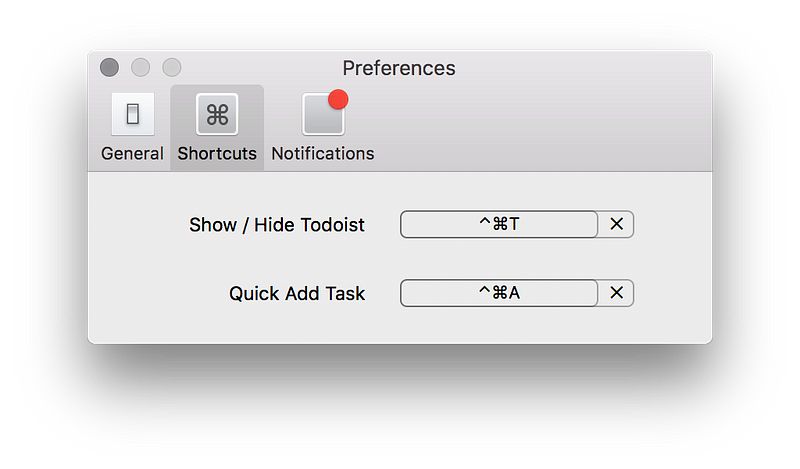
  • Still love using notepad and pen for slowing down(get clarity) my thought process. Using Todoist for work, nice one I must admit specially their shortcut keys. Totally worth going premium with this one.

  • Started meditating with Calm (deleted), _HeadSpace(_deleted) and finally settled with Oak App.

  • Got bored of home gym exercises. Found nice resource for understanding Yoga. Read first part of Inner Engineering. Feels luxurious tbh.

Thanks for reading. :)